OPC Data Acquisition
Genesis OPC Explorer 3.1
About Genesis OPC Explorer 3.1
IDE:
MS Visual Studio 2017
Appl. Size:
11.8 MB (12.386.304)
Creation Date:
20-Oct-2018 18:09:18
Installer Size:
6.70 MB (7.025.823 bytes)
Installer Date
20-Oct-2018 18:43:37
Animated Icon from animatedimages.org
Genesis OPC Explorer 3.1 Menu
Genesis OPC Explorer 3.1
Fast Track
What's New in Release 3.0
Feedback and Awards
Download Counters
Download Genesis OPC Explorer 3.1
Safe Use of Genesis OPC Explorer 3.1
Genesis History
Genesis OPC Explorer Setup
Select OPC Server
Manage OPC Groups
Manage Acquired OPC Items
Manage Calculated OPC Items
Load OPC Project
Save OPC Project
Close OPC Project
Data Acquisition and Storage
Start Data Acquisition
Resume Data Acquisition
Stop Data Acquisition
Display Performance Data
Acquisition Data Matrix
OPC Data Listing
Display of OPC Data Listing
Export OPC Data
Export to Clipboard
Toggle Performance Display
Configure Types Color
OPC Data Charting
Display of OPC Data Chart
Set Chart Series Colour
Set Chart Title Options
Manipulate Chart Display
Set Series Selection
Set Chart Axis
Set Chart Legends
Save Chart Image as File
Save Chart Image to Clipboard
Enable Cursor Data
Toggle Server Data Display
Registration and Support
Register Genesis OPC Explorer 3.1
Support of Genesis OPC Explorer 3.1
Register Support of Genesis OPC Explorer 3.1
Thanks for bringing support to TGMDev
through PayPal Donations...
Set Chart Series
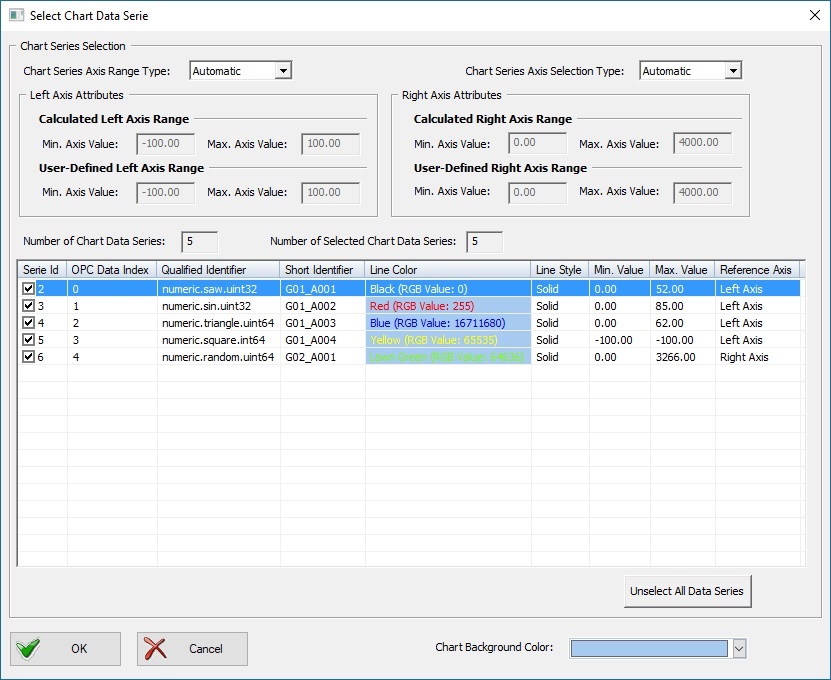
The series actually displayed on the OPC Data Chart can be modified at any time during an OPC Data acquisition session.
Click on the Button 'Chart Series Selection' in the Ribbon Tab 'OPC Data Chart'
Select the Series (using the check box on left of list) and the Series Attributes according to your needs
Chart Series Selection Dialog Box
Confirm with the button 'Ok'
See Also
Set Chart Series Colour
Set Chart Title Options
Manipulate Chart Display
Set Chart Axis
Set Chart Legends
Save Chart Image as File
Save Chart Image to Clipboard
Enable Cursor Data
Toggle Server Data Display
Tell your Friends about Genesis OPC Explorer 3.1
Visitors Count: 35117